HealthBox Pro
Hospital management software

One patient file. Every desk in your hospital.

Reception, doctors, nurses, the lab, X-ray, theatre, pharmacy, wards and accounts all work in HealthBox Pro. Each desk sees what the last one did, and the money adds up at the end of the day. When the internet goes off, your hospital keeps working.

  • Runs on your hospital's own network
  • Naira, HMO, NHIS and company bills
  • Android app for your nurses

Follow one patient through the hospital.

Amina Yusuf walks in with a fever. Hospital number 2418 stays on the file from the front desk to the day Amina goes home, so nobody asks twice and nothing gets lost between desks. Amina is a sample patient, and so is everyone else on these screens.

Reception

Registered once, known at every desk.

Reception registers Amina, gives a hospital number, takes the fee, prints the receipt and puts Amina in the doctor's queue. If a company, HMO or NHIS pays, the bill goes to them with their discount.

  • Patient records, search and the appointment list
  • Hospital services, cash deposits and refunds
  • Receipts on the thermal roll with your logo and a WhatsApp code

Nursing

Vitals are there when the doctor opens the file.

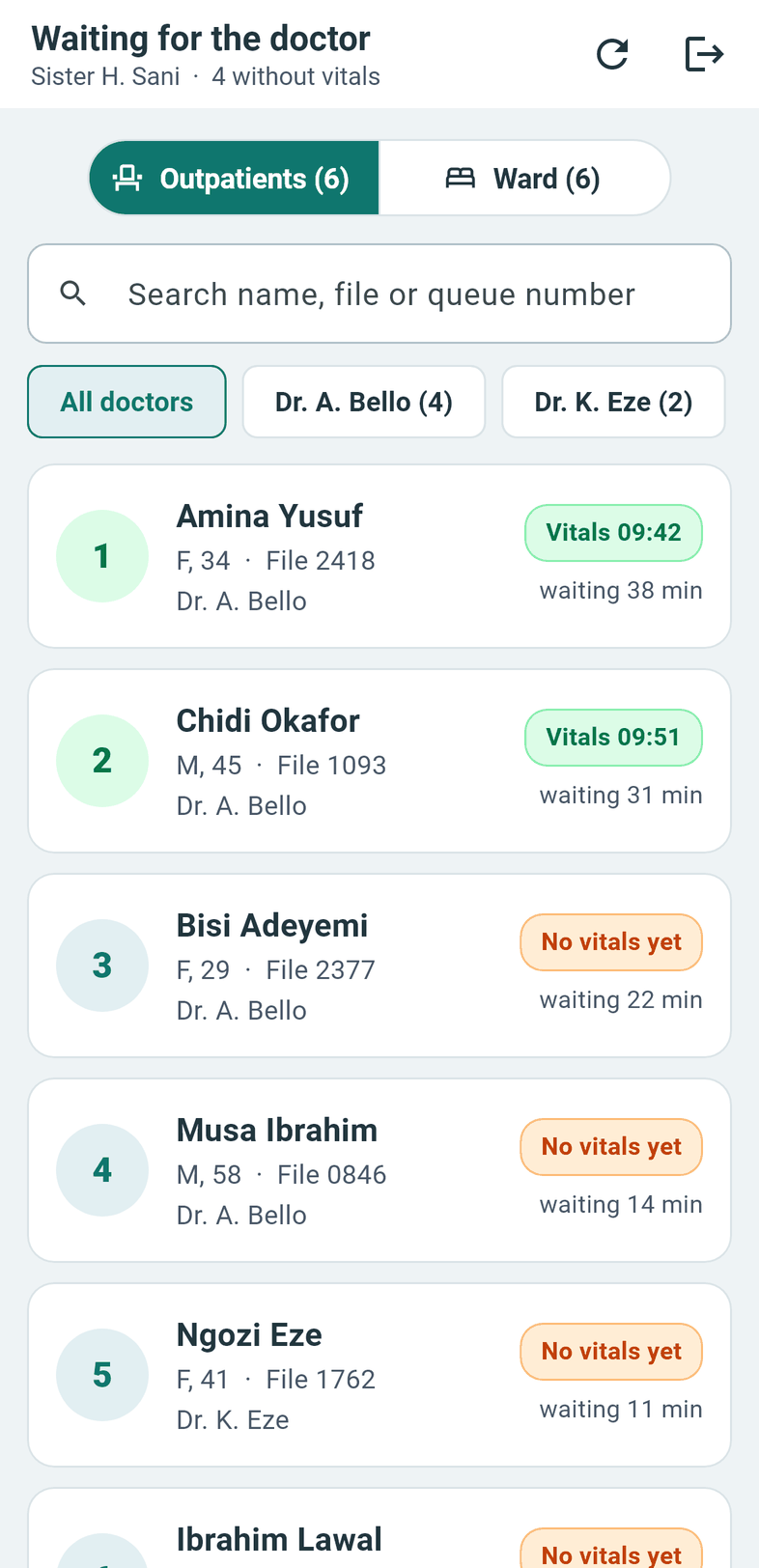
A nurse takes Amina's temperature, blood pressure, pulse, breathing, oxygen, weight and height, on a computer or on the nursing app. BMI works itself out.

  • The outpatients waiting for vitals, in one list
  • Every earlier reading stays on the patient's record
Doctors

The whole file on one screen.

The doctor reads the vitals and past visits, writes notes, adds the diagnosis, sends tests and writes the prescription. Then one press finishes the visit or admits the patient.

  • Notes with bold, italic, colour and lists
  • Any doctor can carry on a note or correct a diagnosis, and HealthBox Pro keeps who changed it
  • The nurses' records and shift reports on the same desk
Lab, X-ray, procedures

Results find their way back to the doctor.

Each request waits at the right desk: outpatients' once they have paid, ward patients' at once. The lab fills its own result forms with normal ranges, X-ray writes its report, and the procedures and surgery desk adds a report if it wants to. The doctor sees it all under Lab & scans.

  • The lab makes and changes its own result forms
  • Printouts signed for the right desk: lab scientist, radiographer or whoever performed it
  • Nurses see that a test was done, never its result
Pharmacy

The prescription reaches the counter before the patient does.

The pharmacist sees what the doctor wrote, with the price and what is on the shelf. Drugs with the nearest expiry go first, and expired stock stays out of what can be sold.

  • Prescriptions, the dispensing queue and the dispensed list
  • Sales to outside customers, without a hospital file
  • Restocking by batch and expiry, with a full stock history
  • Separate surgical and nursing cupboards
  • Load your drug list from an Excel sheet
Wards

Room by room, shift by shift.

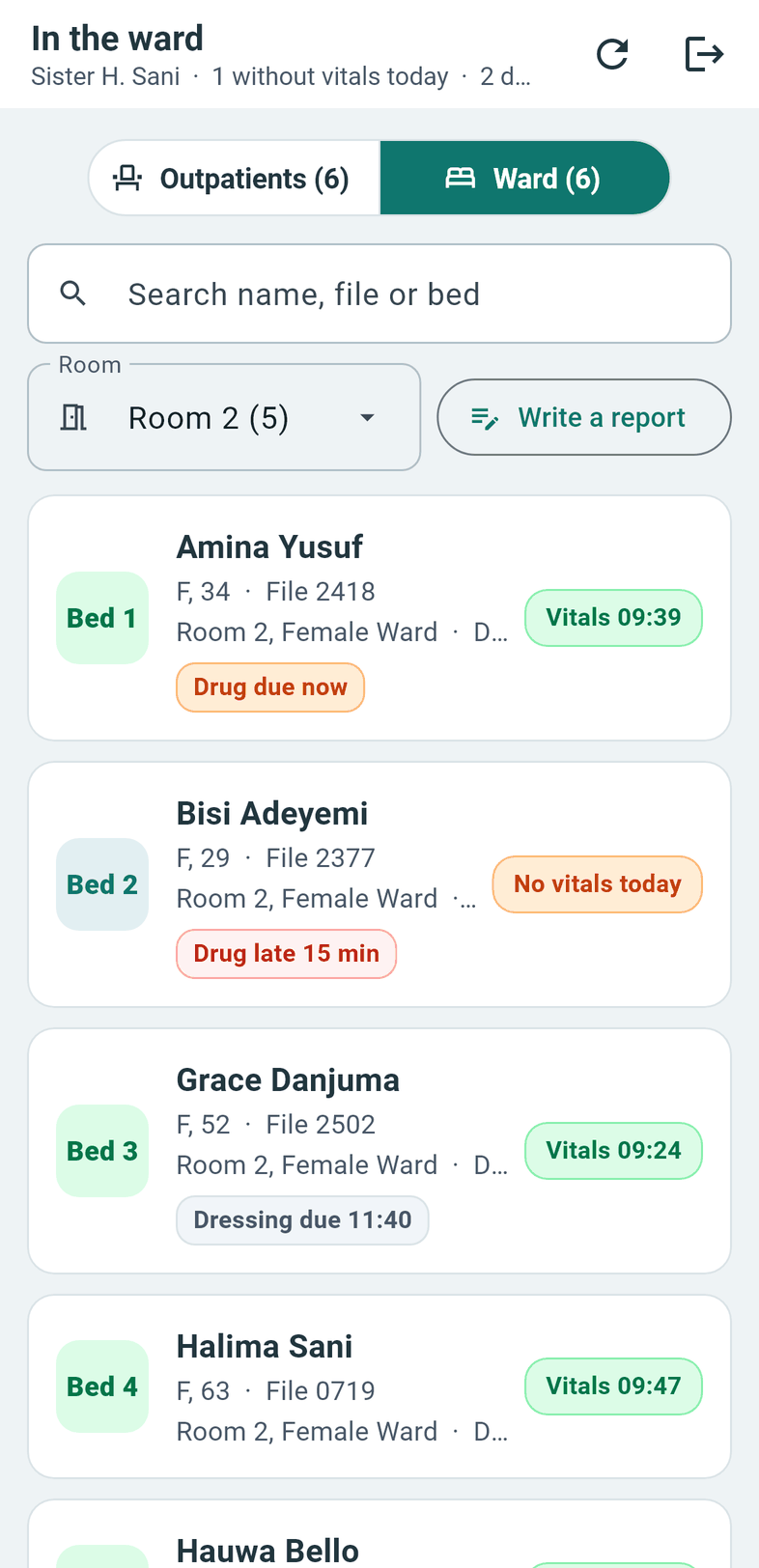
When the doctor admits Amina, the file goes on the admissions queue and reception gives a room and a bed. Nurses see their ward by room, record each dose as it is given and write the shift report, for one patient or for several at once. Doctors read those reports on their round.

  • Drug chart with dose, route and frequency
  • Reports save themselves as the nurse types
  • Only the nurse who wrote a report can change it, and only that day
Accounts

The bill is ready when the patient is.

Room charges work themselves out from the days of the stay and the bed's daily rate. Drugs, theatre and other charges go on the same bill, surgery packages fill in their usual amounts, and deposits and discounts come off.

  • Bills for companies, HMOs and NHIS, with their discount taken off
  • Retainership contracts with their dates
  • Bills print with your hospital's name and logo

Amina goes home. The whole stay stays on file for the next visit.

At closing time, the numbers are already there.

The dashboard shows today's visits, who is admitted and the money received. Each report shows its totals at once and prints with your hospital's name and logo. Whoever may not see money does not see it.

20 reports, ready to print

Money

  • Reception daily check-out
  • Hospital charges records
  • Expenses records
  • Refunds
  • Company transactions

Doctors

  • Doctors transactions
  • Doctors transaction summary
  • Paid to doctors

Wards

  • Admission records
  • In-patient billing records
  • In-patient transactions

Pharmacy and stock

  • Pharmacy daily check-out
  • Pharmacy sales
  • Pharmacy report (by drug)
  • Product report (stock now)
  • Dispensed list
  • Restock history
  • Surgical dispense
  • Nursing station dispense

Lab

  • Lab / X-ray transactions

Everything in HealthBox Pro.

The full list, desk by desk. Each person only sees the desks their role allows.

Reception

  • New patient registration
  • Patient records and search
  • Appointment list
  • Sending patients to the doctor's queue
  • Hospital services billing
  • Cash deposits and refunds
  • Receipts and receipt copies
  • Expenses

Doctors

  • Outpatient queue and ward patients
  • Notes with formatting
  • Diagnoses that can be corrected
  • Prescriptions with dose, route and frequency
  • Lab, scan and procedure requests
  • Admit or finish with one press
  • Past visits, nursing records and reports
  • Admission bills

Nursing

  • Outpatient vitals
  • Ward patients with a room filter
  • Drug chart and doses given
  • Shift reports for one or many patients
  • Reports that save themselves
  • Android app for phones and tablets

Laboratory

  • Outpatient and ward requests
  • Result forms with normal ranges
  • The lab's own forms, made at the desk
  • Results done, and signed printouts

X-ray and scans

  • Outpatient and ward requests
  • Written reports for the doctor
  • Reports done, and signed printouts

Procedures and surgery

  • Requests from doctors and reception
  • A report if the desk wants one
  • Finish when done
  • Surgical cupboard and surgery packages

Pharmacy and stock

  • Prescriptions and the dispensing queue
  • Dispensed list
  • Billing drugs to a patient
  • Sales to outside customers
  • Stock list, restock and stock history
  • Batches and expiry dates
  • Surgical and nursing cupboards
  • Drug list from Excel

Wards and admissions

  • Admissions queue
  • Rooms, beds and daily rates
  • Admitted patients
  • Admission bills with room charges worked out
  • Surgery packages
  • Discharge

Companies and HMOs

  • Companies, HMOs and NHIS
  • Discounts off the bill
  • Retainership contract dates
  • Company transactions report

Accounts and reports

  • Dashboard with today's figures
  • 20 printable reports
  • Reception and pharmacy daily check-outs
  • Doctors' transactions and payments
  • Expenses and refunds
  • Banks and account types

Your hospital's set-up

  • Your name, logo and letterhead
  • Doctors and staff
  • Services and prices
  • Rooms and beds
  • Bill particulars
  • Printers for each computer

Control and safety

  • Users, with 11 ready-made roles
  • Permissions you can change for each role
  • Activity log
  • Daily backup and restore
  • Hospital website from anywhere
  • Updates itself, starts with Windows

The internet goes off. Your hospital carries on.

Every computer and tablet works from one main computer inside your hospital, over your own network. The website is a copy of the same records, so the administrator and the doctors can sign in from anywhere, on a phone too, with the same names and passwords.

Try it: switch the internet off.

Inside your hospital

Main computerEvery desk working
Reception
Doctors
Pharmacy
Lab
X-ray
Nurses' tablets

Your website

Doctor at home
Administrator away
Nursing app

The ward round, in the nurse's hand.

The HealthBox Pro nursing app runs on Android phones and tablets over your hospital's Wi-Fi. Nurses sign in with their usual names and work at the bedside, and what they record goes straight into the patient's file.

  • Outpatients and ward patients, filtered by room
  • Vitals, doses given and shift reports with bold, italic and colour
  • Finds the main computer again when the router restarts
  • Shows each test's name and status, never its result

You decide who sees what.

Each person signs in to their own desk. Menus and buttons follow the role, and the system checks again behind every action, so a role that may not see money or lab results never gets to them.

  • Eleven ready-made roles

    Administrator, doctor, nurse, receptionist, cashier, pharmacist, lab scientist, radiographer, procedure and surgery, accountant and store keeper. Change what any of them may do.

  • An activity log

    Sign-ins, failed attempts, lock-outs, password changes and changes to users and roles are all on record, with who and when.

  • A backup every day

    The main computer makes a daily copy of all records into the folder you choose. A restore puts everything back, or moves the hospital to a new main computer.

  • Updates that install themselves

    New versions go in when HealthBox Pro opens, on every computer, and each one is checked to be a genuine HealthBox Pro update first.

Three steps to get going.

  1. Set up the main computer

    Install HealthBox Pro on one computer at the hospital. It holds all the records and starts with Windows.

  2. Connect the other computers and tablets

    They find the main computer on your network, and find it again if its address changes.

  3. Add your hospital

    Your logo, staff, services, prices and rooms. Load the drug list from Excel, and each person signs in to their own desk.

Moving from another system? Ask us about bringing your patient records across.

See HealthBox Pro with your hospital in mind.

Tell us about your hospital and we will walk you through each desk.